Ubuntu 20.04.1 + LTS Ubuntu Linux operating system
Ubuntu It is one of the Linux
distributions that is based on Debian but differs from Debian in several
ways. The name Ubuntu is derived from one of the South African concepts
meaning "Humanity Towards Others". One of the points of interest in the
Ubuntu project is the emphasis on accessibility and globalization. For
this reason, this software is available for all nationalities. It is
very easy to work with and even unfamiliar users easily get used to its
environment. All versions of Ubuntu are free forever. Ubuntu CDs are
sent free to those who request them by mail. There is also a project
called Ubuntu (Edubuntu), which, as its name suggests, is very suitable
for use in classrooms and educational environments.
Features of Ubuntu:
Automatic security updates
Defense against viruses and malicious software
Has anti-phishing technology
File encryption
Password protection
Easy to use
Create professional documents, spreadsheets and presentations
Compatible with Microsoft Office
Access emails, address book and calendar with Thunderbird
Manage email and chat accounts
Manage, edit and share your photos and videos
Great support for cameras and mobile phones
Ability
to open and edit files such as Word documents, Excel spreadsheets and
PowerPoint presentations and share them quickly and easily with other
users
Very nice user interface
Access to thousands of
free software with the topics of books and magazines, programming and
development tools, education, fonts, games, graphics, internet, office,
engineering and science, audio and video, system, shell and application
and...
Compatible with all types of devices
Extremely high speed and security
High speed and security in browsing the Internet
Support for different browsers such as Mozilla Firefox, Google Chrome, etc.
Play, create and edit MP3, play music on computer or mobile
Wondershare UniConverter 14.1.6.107 Win/Mac Convert video files
Wondershare UniConverter It is a
powerful software in this field that has the ability to convert common
formats and can convert most audio and especially video formats with the
highest possible speed. Maybe there is no format that this tool can't
convert to other formats and that's why users can easily use this tool
for all their formats and conversions. Playing converted videos using
the software's internal player is one of the interesting features of
this tool. Wondershare UniConverter also has the ability to convert
formats to DVD in order to make DVD movies, which is very much needed by
users today due to the popularity of DVDs.Wondershare UniConverter is
not only powerful in converting, but also has interesting features such
as the ability to easily edit files, add various effects, the ability to
communicate between portable audio and video systems, etc., which can
be used as additional features. be used a lot. All these functions and
capabilities are easy to use and most of the beginner users can achieve
all their needs with a little patience and due to the attractive user
relationship of the software.
Features of Wondershare UniConverter software
Convert
video formats with excellent quality and support various video formats
including MP4, MOV, 3GP, AVI, WMV, RM, MPEG-1, MPEG-2, FLV and ASF
A flexible audio converter with support for M4A, WMA, WAV, MP3, AAC and AC3 formats
Support for all audio and video players such as iPod, Zune, PSP, Pocket PC, Creative Zen, Archos and...
Put a watermark photo or text on the video
Adjust brightness, contrast, saturation or even put special effects on the video
Split large video files into multiple files
The ability to transfer files between iPod and computer without the need for iTunes software
Ability to cut and remove unnecessary parts of the video
Ability to import and edit subtitle files in SRT, SST and SSA formats to convert to any video format
The possibility of viewing the video preview with the desired quality
Convert video format to MP4, AVI, MOV, FLV, MPEG, 3GP, WMV and...
Has Video Joiner function to merge and join multiple video files into one file
Support
for iPod, Zune, iPhone, Apple TV, PSP, Xbox 360, PS3, Archos, iRiver
PMP Player, Creative Zen, PMP, MP4/MP3 Player and smartphones
It has complete settings for audio and video files
Capturing favorite parts of movies and videos
And ...
Supported Devices
Manufacturer NameDevice Models
Apple brandiPhone
XS, iPhone XS Max, iPhone XR, iPhone X, iPhone 8, iPhone 8 Plus, iPhone
7, iPhone 7 Plus, iPhone 6, iPhone 6 Plus, iPhone 6S, iPhone 6S Plus,
iPhone SE, iPhone 5, iPhone 5C, iPhone 5S, iPhone 4S, iPad Pro, iPad Air
2, iPad Air, The New iPad, iPad 2, iPad mini 4, iPad mini 3, iPad mini
2, iPad mini, iPod touch5, iPod Touch4, iPod Touch3, iPod Touch2, iPod
Touch, iPod Classic, iPod Nano, Apple TV, Apple TV2, Apple TV3.
Google brandPixel, Nexus 6 Pro, Nexus 6, Nexus 5X.
Supported GPUs for Windows Version
Brand NameGPU Models
Intel brandHD
Graphics 2000, HD Graphics 3000, HD Graphics 2500, HD Graphics 4000, HD
Graphics 4200, HD Graphics 4400, HD Graphics 4600, Iris Graphics 5100,
Iris Pro Graphics 5200, HD Graphics 5300, HD Graphics 5500, HD Graphics
5600, HD Graphics 6000, Iris Graphics 6100, Iris Pro Graphics 6200, HD
Graphics 510, HD Graphics 515, HD Graphics 520, HD Graphics 530, Iris
Graphics 540, Iris Graphics 550, Iris Pro Graphics 580, HD Graphics 610,
HD Graphics 615, HD Graphics 620, HD Graphics 630, Iris Plus Graphics
640, Iris Plus Graphics 650.
AMD brandRadeon
HD 7700 series (HD 7790 (VCE 2.0)), Radeon HD 7800 series, Radeon HD
7900 series, Radeon HD 8570 to HD 8990 (HD 8770 (VCE 2.0)), Radeon R5
240 / R7 240 / R7 250 / R7 250E / R7 250X / R7 265 / R9 270 / R9 270X /
R9 280 / R9 280X, Radeon R5 330 / R5 340 / R7 340 / R7 350 / R7 370 / R9
370 / R9 370X, Mobile Radeon HD 77x0M to HD 7970M, Mobile Radeon HD
8000-Series, Mobile Radeon Rx M2xx Series (R9 M280X: VCE 2.0, R9 M295X:
VCE 3.0), Mobile Radeon R5 M330 to Radeon R9 M380 and Radeon R9 M390,
FirePro Cards with 1st Generation GCN (GCN 1.0), Radeon HD 7790 / HD
8770, Radeon R7 260 / R7 260X / R9 290 / R9 290X / R9 295X2, Radeon R7
360 / R9 360 / R9 390 / R9 390X, Mobile Radeon R9 M280X, Mobile Radeon
R9 M385 / R9 M385X, Mobile Radeon R9 M470 / R9 M470X, FirePro-Cards with
second generation GCN, Tonga: Radeon R9 285, Radeon R9 380,Radeon R9
380X / Mobile Radeon R9 M390X / R9 M395 / R9 M395X / Radeon R9 M485X,
Tonga XT: FirePro W7100 / S7100X / S7150 / S7150 X2, Fiji: Radeon R9
Fury / R9 Fury X / R9 Nano / Radeon Pro Duo / FirePro S9300 / W7170M,
Polaris: RX 460 / 470 / 480.
VLC Media Player 3.0.18 Win/Mac/Linux/android Multimedia player
VLC Media Player A professional software
that can be placed in place of all software that is installed as a
player on the system because it is able to support 99% of formats. Also,
VLC software is able to convert different formats to each other.
Consider that in order to run your DVDs, you must install heavy software
such as Cyberlink PowerDVD or Corel WinDVD on your system. In addition
to occupying a relatively large space of your hard disk, these softwares
also occupy a large space of the system memory (Ram) to play movies.
But the VLC Media Player that you download from csksoftg is very
lightweight while it can play DVDs easily.
VLC
for Android It is a free and functional Android application for viewing
video files and playing audio files. The VLC application supports all
audio and video formats including MKV, MP4, AVI, MOV, OGG, FLAC, TS,
M2TS and AAC and provides the best quality to users like the Windows
version. VLC has a simple and attractive user interface and displays
videos with subtitles. Adjusting the light and rotating the videos is
one of the other features of this practical application.
Features of VLC Media Player software
Playing various formats including MPEG-1, MPEG-2, MPEG-4, DivX, mp3, ogg, ...
DVD, VCD playback
Full support of various audio and video formats
Playback of DVDs, VCDs with FULL HD quality
Very small volume compared to its many features and also compared to similar software
Very simple and user-friendly environment completely free
Support for incomplete downloaded files and playback of corrupted discs
Support in different languages, including sweet Persian language
Ability to run on most operating systems, i.e. Windows, Linux, Macintosh, etc.
Multiple skins for different tastes
Support for various audio and video formats and subtitles
DroidKit – An All-in-One Solution for Android Problems
Android OS has improved a lot over time, but it can still fall prey
to malware attacks or other system issues that make your phone either
slow down or (even worse) lose your data. Even if there are no software
problems, you may accidentally delete your data in a heedless moment.
However, in such a situation, instead of leaving your device at the
mercy of a repair shop (which may be both risky and expensive), you need
a reliable data recovery tool to retrieve your data and resolve system
issues yourself. And this is where DroidKit comes into play.
DroidKit is a highly versatile, simple-to-use, and completely reliable Android data recovery and system repair tool.
In this post, I will give a comprehensive review of DroidKit, its
features, and the different ways it can help you deal with Android
device issues.
Two of the most common issues that Android devices usually face are
data loss and system issues. And DroidKit helps you in resolving and
recovering from both these issues. From photos and files to chats from social media and messaging apps, DroidKit can retrieve data from several platforms.
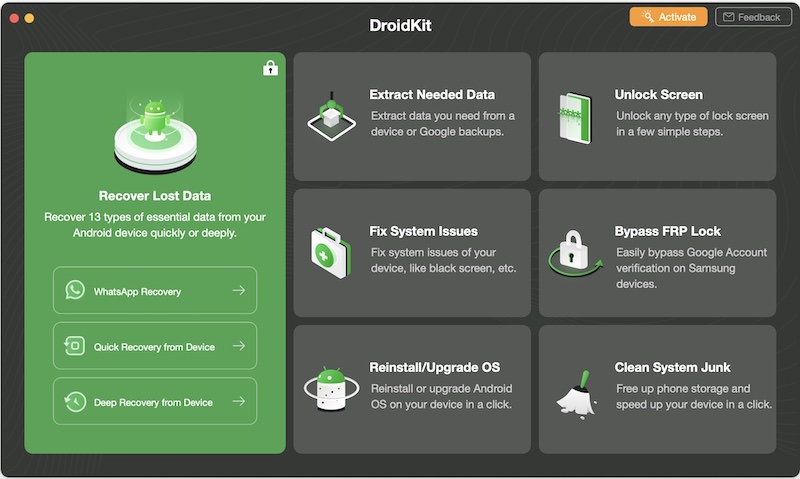
Moreover, if your Android device is underperforming, you can use DroidKit to clear system junk and speed it up and even use it to bypass screen lock or Samsung FRP locks – all of this without needing to root the device.
Unlike many other data recovery tools in the market, DroidKit works with Windows as well as macOS computers, supports all Android device models, and has the highest success rate when it comes to resolving Android device issues.
But, this is just the tip of the iceberg. There is a whole gamut of ways in which DroidKit can help you achieve Android repair and recovery feats easily and within no time. Following is the list of some of the most interesting features of DroidKit.
Note:
For reading convenience, I have segmented the features based on the two major problems the tool solves, i.e., data loss and Android system issues.
DroidKit with Android Data Loss
DroidKit offers comprehensive solutions for extracting and retrieving
any lost data from your Android device, SIM card, or your Google
account. All of its data recovery features are reliable and offer the highest success rate.
You can find more information on these features below:
1. Recover data not backed up
Most of us either forget or overlook that creating a backup of your
data is important. However, if you lost data on your Android device and
didn’t have a backup for it as well, then DroidKit’s data recovery feature might be able to save your day.
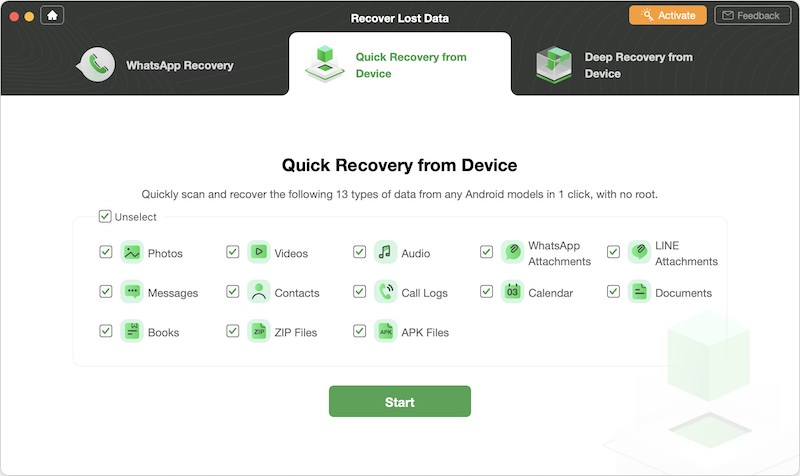
Through the data recovery tool, you can retrieve 13 different types of essential data from your Android device
in just a few clicks and without rooting. This includes photos,
WhatsApp chat, text messages, contacts, videos, audio files, call logs,
calendars, documents, books, ZIP files, APK files, and Line files.
It supports a wide selection of Android phones and tablets – 200,000 device models
to be precise – from all phone manufacturers. Also, you can preview all
the lost data to select only the things you want to retrieve.
What’s interesting is that it gives you two ways to recover data from your device
i.e., quick data recovery and deep data recovery. You can choose any of
these data recovery options according to your requirements.
Quick Recovery
The quick recovery process makes an instant scan of your device to retrieve lost data without rooting the device.
Therefore, in case of data loss, the quick recovery process could be
your first choice to instantly recover the data within minutes.
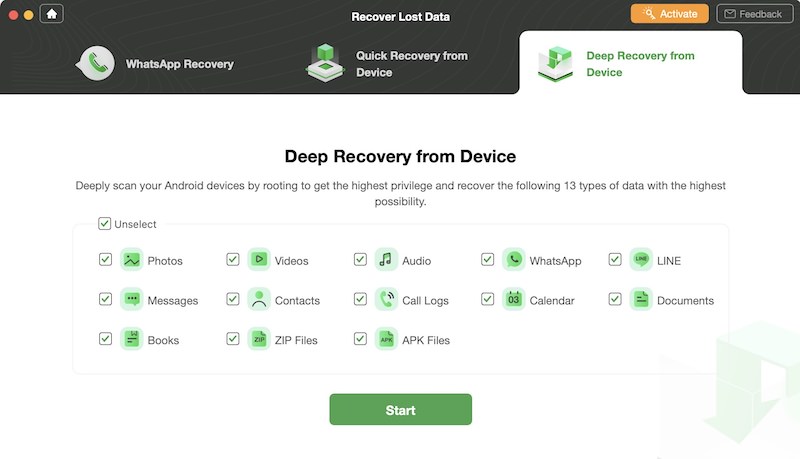
Deep Recovery
On the other hand, the deep recovery option undertakes a deeper and more comprehensive search for lost data on your device.
Though it requires device rooting accompanied by a step-by-step guide
to make the rooting process easier, it has the highest success rate when
retrieving lost data.
2. Recover data from system-crashed Samsung device
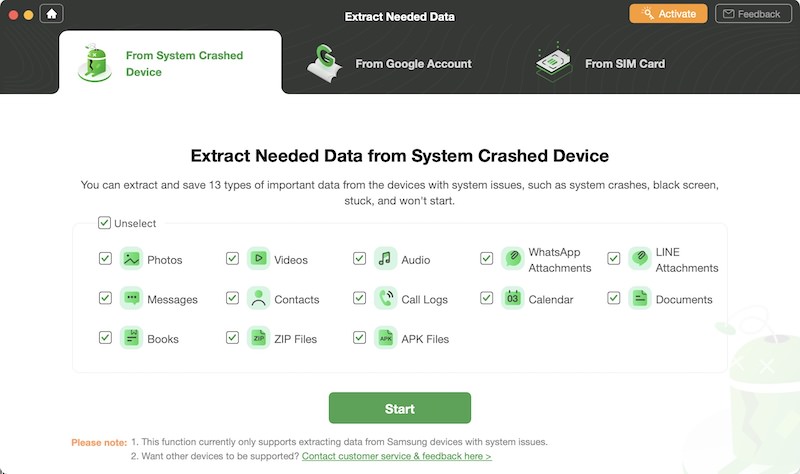
If you use a Samsung device and face data loss due to a system crash,
this feature will help you recover lost files, messages, and documents.
You can use it to extract all 13 types of data mentioned above on Windows, or Mac.
Not just this, if the system crash in your Samsung device causes issues like black screen, frozen screen, or unresponsive touch, then you can use this feature to access your data, preview what’s needed, and extract all the important stuff so you can save it from getting deleted forever.
Also, while extracting your data, DroidKit automatically detects duplicate files and skips them to avoid redundancy on your recovered data.
3. Extract data from Google Account
You can backup and sync all kinds of data in your Google Drive
account, including photos, contacts, WhatsApp messages, calendars, etc.
Similarly, a lot of data is saved in your Google account, and Google
backs up your WhatsApp data. Therefore, it can be a good source for
recovering data if your Android device crashes down or falls prey to
malware.
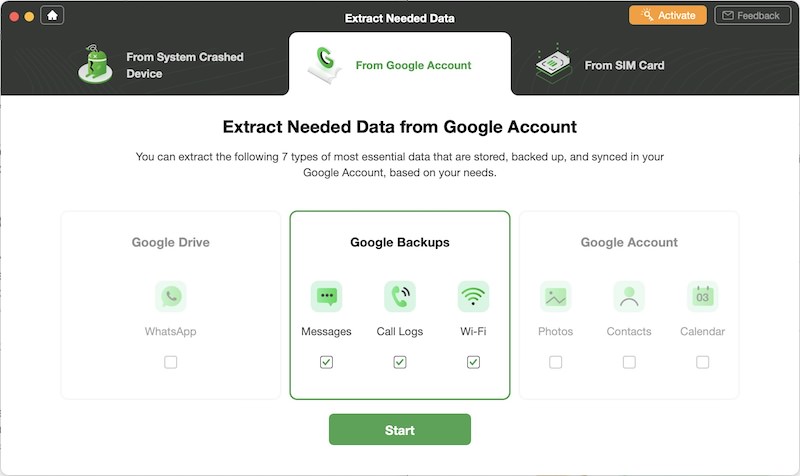
In case you’d want to extract data that’s saved in your Google Drive, Google account, or Google backup, DroidKit could help you in accessing, previewing, and then extracting it anywhere you want.
DroidKit allows you to extract seven different types of data from different Google platforms, including WhatsApp
data (Google Drive), text messages, call logs, WiFi data (Google
backups), and photos, contacts, and calendars (Google account).
What’s good about this feature is that DroidKit upholds your privacy during the extraction process and works with SSL-256 encryption to protect your data. That way, you can be assured that your Google account passwords or any personal information will not be compromised.
4. Extract data from SIM card
It may happen that you lose contacts saved on your Android device, and the only way to get them back is through the SIM card.
In such a situation, DroidKit can help you extract data (phone numbers, addresses, emails, and other information) from your SIM card and allows you to save it on your computer or device in seconds. The data you extract from the SIM card will be in .VCF format so you can better manage it according to your requirements.
DroidKit with Android System Issues
1. Unlock screen without password
It is good practice to password-protect your Android device to
prevent it from being misused by kids or strangers. However, sometimes
you forget your device’s password and get locked out of using it. Well,
DroidKit can easily help you out of this situation.
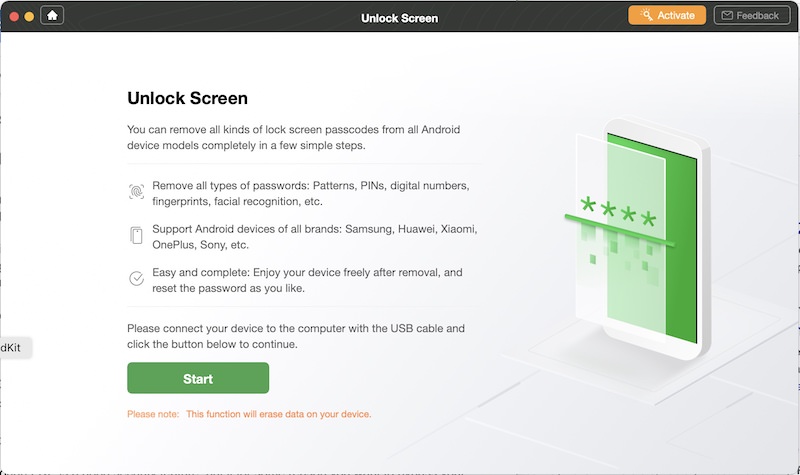
DroidKit’s Unlock Screen feature allows you to bypass any screen lock, including 4/ 6-digit PIN, facial recognition, fingerprint ID, password, or pattern. This feature can open any Android device model from any phone/ tab manufacturer.
Moreover, DroidKit makes the device unlocking process simple with a step-by-step guide and a user-friendly interface. So anyone without any prior technical knowledge can easily use this feature. And the best part is, you don’t need to root your device for unlocking.
2. Bypass Samsung FRP Lock
FRP – Factory Reset Protection – is a security feature on Android devices
(Lollipop and higher) that allows you to factory reset or activate your
device using your Google account. FRP is a built-in feature in most
Samsung phones to protect your device and data.
Although FRP is a good security feature if for some reason you want
to bypass or reset your Samsung phones’ FRP lock, then DroidKit has a
feature just for that.
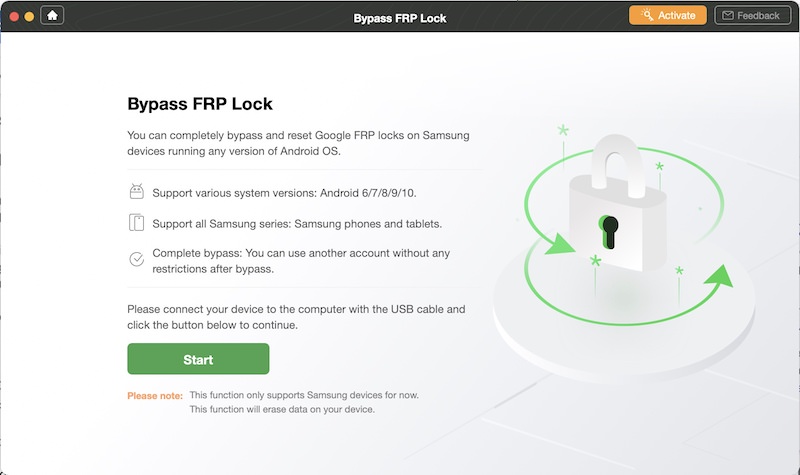
The Bypass FRP Lock feature works with an array of Android OS versions (Android 6, 7, 8, 9, and 10) and supports all Samsung phones and tablet models. Also, the tool works on both Mac and Windows computers, unlike many other tools in the market.
Once you bypass the FRP lock on your Samsung device, you can regain its full access, get the previous Google account completely removed from the device, and log in with another Google account to use all features.
3. Clean system junk
If your Android device is underperforming, chances are that it’s
choked with junk files. Junk files also eat up storage space in your
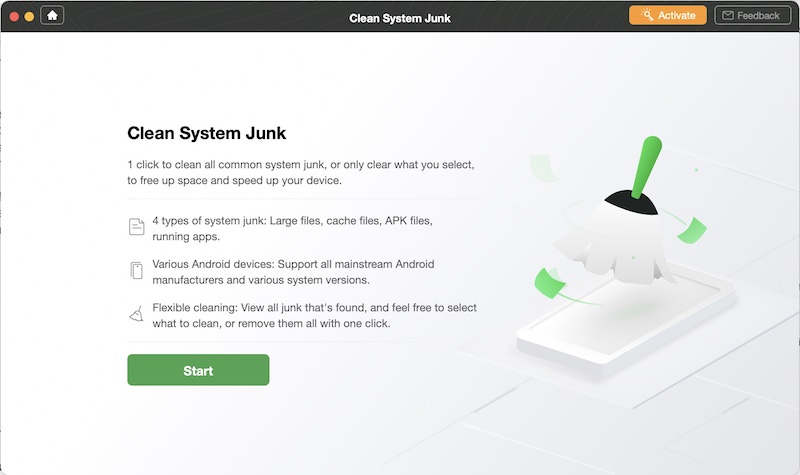
device. Therefore, it is imperative to remove the system junk, and DroikKit’s Clean System Junk feature can help you with that.
You can clean all system junk files or just select ones to free up
space and ensure better performance of your device. The type of junk
data you can clean up with DroidKit includes bulky files, APK files, cache, and running apps. It supports all mainstream devices with Android versions 5 to 10 and offers an intuitive interface for anyone to use.
The tool scans your system for all kinds of junk files and offers a scan report within seconds.
You can select the files you’d like to remove and wait for a while
until your device is cleared of all the junk files, and you can feel the
enhanced performance.
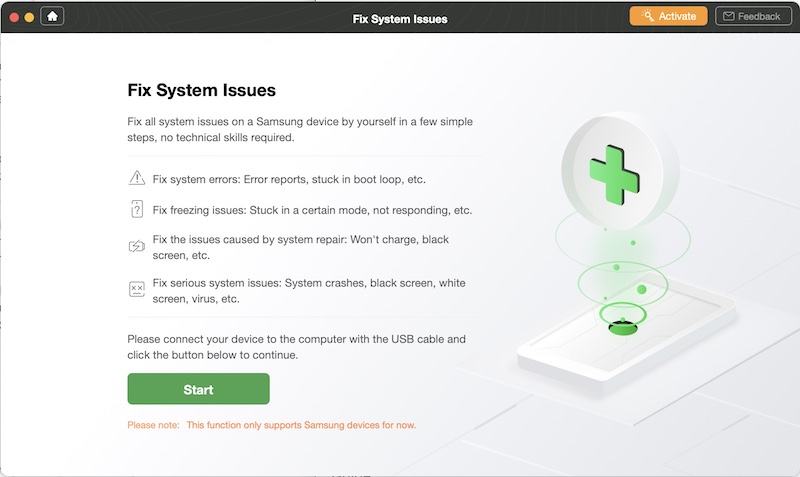
4. Fix Android system issues
Everybody knows what a troubling situation it is when your phone
faces system issues like a black screen, crashing apps, or the screen
freezes up. But instead of worrying, you can take help from DroidKit’s Fix System Issues feature.
With this feature, you can handle issues like frozen screen,
black screen, overheating device, the camera failed, unresponsive touch
screen, crashing apps, logo stuck on screen, boot loop, issues with
firmware upgrade and many more.
Moreover, for each Android OS, DroidKit has customized solutions to deal with system issues, and it resolves all the issues mentioned above without rooting your device. Plus, it’s completely secure and so straightforward that even the non-techies can use it easily.
Note:
This feature is only available for Samsung devices.
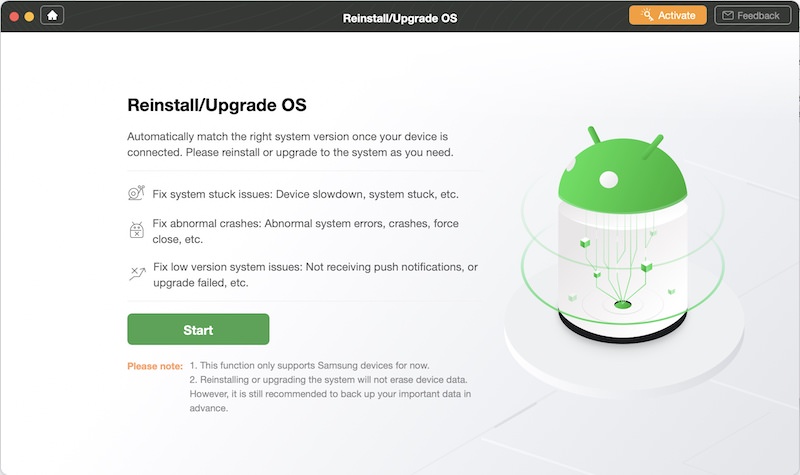
5. Reinstall / upgrade OS
If for some reason, you want to reinstall or upgrade your Android operating system, then you can easily do so with DroidKit’s Reinstall/Upgrade OS feature. It enables you to resolve system stuck issues, fix abnormal crashes, and eradicate issues caused by a lower OS version.
Additionally, the feature can automatically match the right system version for your device, and you can reinstall or upgrade the system as per your requirement.
Note:
This feature is only available for Samsung devices.
Summary
There can be any number of things that may cause problems for your
Android device, so one should be prepared with a reliable solution. You
shouldn’t be taking the risk of losing your data for good, nor should
you leave your device in the hands of a repair shop, especially when there’s a reliable solution like DroidKit around.
DroidKit has everything you need to fix your Android device issues on your own
and all the features mentioned above vouch for that. It offers all
kinds of data recovery and Android system repair solutions under one
roof, and most of these solutions work without rooting your device.
Additionally, there are many tools in the market claiming to recover
your lost data or resolve system issues on Android devices, but DroidKit
is the most versatile and has the highest success rate among all other tools in the market.
If you have any doubts about any of the DroidKit features mentioned
in this article, you can install DroidKit on your Windows or Mac
computer and see the results for yourself.
SuperCopier is a very speedy process of copying or transferring &
moving any sort of files within seconds. This convenient file managing
software provides users complete control in order to copy or move as
much quantity files as they want to in their preferred place.
It has got a normal and smooth to use user interface. SuperCopier
provides users for taking a look carefully at the outcomes of the
transfer session. It’s handy for both beginners as well as experts. For
beginners as they want a trustworthy file copying process and for
experts as they want certainty on the copying process of their work and
to being copied to the location where they targeted. It has got an
extensive collection of necessary features that one will find in less
software.
As it helps you to do easy
copying and other processes, alongside it allows users to make a
schedule of file transferring process the way they want any time. It
provides the functionality drag and drop to ensure users that the
software is well-organized. It allows operating all way of simulation
functions within some clicks. The best thing about this software is
users can use for both sectors like personal works and commercial works.
Moreover, it can be run on nearly all sorts of desktop and laptop. As
the software is lightweight so one can be able to download it very
quickly on their available devices and can install by taking instruction
from their on-screen instruction given therewith.
After
running this software within seconds you can start and can see there
provided simple but powerful toolset. The transfer protocol is connected
by a recent file transfer status, complete batch transfer status, and 4
tabs to manage transfers such as 1. Copy List- there one can see the
scheduled files listed for transfer, you can customize your schedule and
make category them moreover save it for future use, 2. Error- there
will be listed the error process of transferring, 3. Interface- to
manage app presence in different conditions, 4. Copy Engine- to handle
exact parts of copying. There have loads of more tabs users will find in
the standalone window which have extra customizations like General,
Copy Engine, Plugins, Plugin Loader, Session Loader, Listener, Log, and
Themes.
SuperCopier Technical Setup Details:
Here
given some really important technological setup details helps you know
everything about this software and you can experience before using
Supercopier.
Setup File Title: Supercopier.
Setup File Title: SuperCopier22beta.exe
Full Setup Size: 7 MB (approx.).
Setup Installing Type: A complete Standalone Setup / An Offline Installer.
Compatibility Architecture: x86 (32-Bit) & x64 (64-Bit).
Software License: Free Trial.
SuperCopier System Requirements:
Before
you start downloading Supercopier, you have to be sure that your
computer has the least system requirements that give herewith.
Operating System (OS): Windows 2000, 2003, 7, 8, 10, XP, Vista (32-Bit or 64-Bit).
Memory (RAM): RAM needed 1.00 GB.
Hard Disk Space (HDD/SSD): Free space needed 10 MB.
Processor (CPU): Intel® Pentium III or Faster
SuperCopier Free Download
Click
on the down button and get Supercopier. This is a whole standalone
setup & an offline installer of Supercopier. Its Compatibility
Architecture is x86 (32-Bit) & x64 (64-Bit). With accurate system
requirements, one can easily download this software with no survey and
suffer.